


Virgin Voyages
4.8405.00 Reviews
App Specs
- Version
- 1.12.0
- Updated On
- License
- Free
- Downloads
- 100,000+
- Developer
- Virgin Voyages
- Categories
- Travel & Local
- Platform
- Android
Screenshots
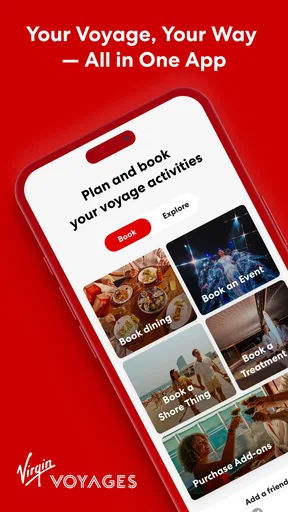

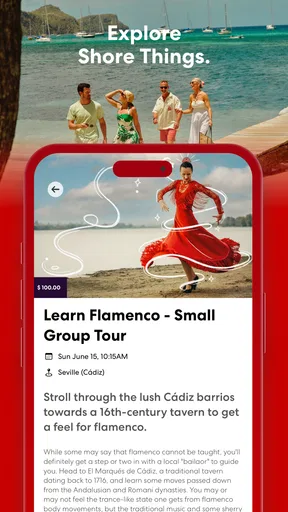
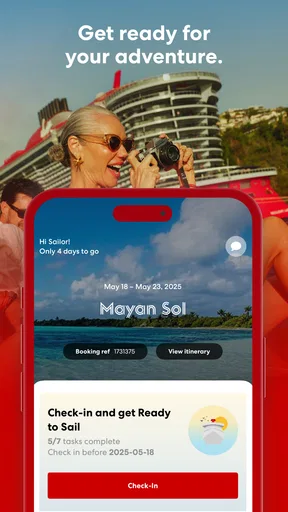
 Analysis by AppCompare
When I use a cruise app, I want it to remove small decisions rather than create another task to manage. Virgin Voyages is built for that purpose: it is a free Travel & Local app from Virgin Voyages that puts the cruise experience on a phone instead of leaving every detail to printed schedules, signs, or a visit to guest services. I found its strongest value in the moments when plans change quickly and I need the relevant information in front of me without searching through several unrelated tools.
The app is available for everyone, and its store profile shows a 4.8 average from around 8,400 ratings, with more than 100,000 installs. Those figures suggest that it has reached a substantial audience for a cruise companion, but they are not a substitute for personal expectations. This is a focused tool for people sailing with Virgin Voyages, not a general travel planner that will organize an entire holiday across different cruise lines, airlines, hotels, and destinations.
How the app feels when plans are moving quickly
My first impression is that the app makes most sense before and during a voyage, when information has practical value only if I can reach it quickly. A cruise day can involve several competing choices: where to go next, what activity fits between meals, whether a change affects the rest of the evening, and how to keep track of plans while moving around the ship. A dedicated companion is more useful in that setting than a general calendar because it is tied to the voyage rather than asking me to recreate the trip manually.
Virgin Voyages presents itself as a personal guide for time at sea, and I think that framing is more accurate than treating it as a broad destination-discovery app. Its job is to keep the cruise experience close at hand. That makes the app especially appealing to first-time guests who do not yet know the ship’s rhythm, as well as to experienced travelers who would rather check one cruise-specific place than rely on scattered notes.
The perceived speed is likely to matter most during transitions. If I am leaving one activity and deciding what comes next, a short path to useful information is more valuable than a visually elaborate interface. In everyday use, I would open it with a specific question in mind rather than browse aimlessly: what is happening next, where should I look, or what part of the voyage needs attention? That habit should make the experience feel faster because I am using it as a decision tool instead of a feed.
There is also a practical distinction between the app and a paper itinerary. Paper is dependable when plans stay fixed, but it becomes awkward when I need to compare several possibilities or adjust my day. A phone app is easier to carry and revise, although it introduces its own dependency on the device. For me, that trade-off is worthwhile on a cruise, provided I prepare the phone before leaving the cabin and do not assume the app alone should replace basic travel documents.
Where it saves time on a real cruise day
Imagine a realistic afternoon at sea. I have finished lunch, want to join something later, and need to fit in time to change before dinner. Instead of asking another passenger, walking around to find a notice, or trying to remember a schedule from earlier, I would use the app to narrow down the next part of the day. The gain is not dramatic in a single tap; it comes from avoiding several small interruptions that otherwise accumulate.
Worth Reading Before You Choose

EA SPORTS FC Mobile 26 Is a Bigger Football Game, but It Takes Time

Flipboard Shows What News Apps Must Do Beyond the Feed

Switching to Android Auto Means Rethinking Your Driving Routine

Google Calendar Makes a Crowded Week Easier to Manage

Ludo King Makes the Most of the Minutes Between Plans

Baby Panda World Brings Quick Play to Modern Phones, but Its Game Library Feels Busy
This is particularly useful for couples or groups with different interests. One person may want a quiet break while another wants to continue with activities. A shared cruise reference can reduce the back-and-forth of repeating times and locations. It does not eliminate the need to agree on a plan, but it gives everyone a common point of reference, which is more practical than relying on one person’s memory.
A less obvious benefit is using the app as a planning buffer rather than a minute-by-minute command center. I would check it at the start of the day, identify a few priorities, and then stop looking constantly. That approach saves battery, reduces screen time, and leaves room for the spontaneous parts of a cruise. The app is most helpful when it supports decisions, not when it turns relaxation into schedule management.
What happens during heavier use
The busiest moments are likely to be the periods when many guests are checking plans at once or when I am moving through a crowded ship and trying to make a quick decision. A cruise companion can feel essential in those situations, but heavy use also exposes the difference between a genuinely responsive tool and one that becomes frustrating under pressure. I would judge it less by how quickly it opens in a quiet cabin and more by whether it remains practical during the rush before popular activities or evening plans.
I also would not expect every interaction to feel equally immediate. Any app that depends on current voyage information can be affected by the quality of the onboard connection, the phone itself, or the amount of information being loaded. That is why I prefer a simple workflow: check important details early, keep the phone charged, and avoid waiting until I am already late. This is not a criticism unique to Virgin Voyages; it is the sensible way to use any cruise-dependent mobile tool.
For families and larger groups, heavier use may come from repeated checking rather than one long session. Several people may want the same information while coordinating different plans. The app can help, but it cannot solve the social problem of everyone changing their mind at the same time. My advice would be to agree on a few anchor points for the day and use the app to support those decisions, rather than expecting it to coordinate every person automatically.
Another useful trade-off is that a dedicated app can be faster to understand than a general travel platform because its purpose is narrower. The downside is that its usefulness is also narrower. If I am comparing flights, researching a city after the cruise, or managing hotel reservations, I would still use the relevant travel services. Virgin Voyages is strongest inside its own cruise context, where focus matters more than breadth.
Stability and recovering when something goes wrong
Reliability is not only about avoiding crashes. On a voyage, I also care about recovering gracefully after leaving the app, losing a connection, switching between screens, or returning to it after the phone has been idle. A cruise companion should make it easy to resume a task without forcing me to remember where I was. That recovery experience can matter more than a polished first launch because travel involves interruptions constantly.
I would treat the app as a helpful layer, not the only place where important information exists. Before boarding, I would make sure I know the basic travel details I may need independently and would keep essential confirmations accessible in another form. Once onboard, I would open the app early enough to become familiar with it, rather than waiting for a time-sensitive decision. This is a simple precaution, but it prevents a minor technical delay from becoming a stressful one.
The app’s current version is 1.11.1, which indicates an actively maintained product rather than an abandoned experiment. I still would not interpret a version number as a guarantee of perfect stability on every phone. Updates can improve an app, but they can also change navigation or introduce new behavior that I want to understand before relying on it during a busy travel day. Installing updates before the trip, rather than during an important moment, is the safer workflow.
When an app does not behave as expected, the best recovery approach is straightforward: close and reopen it, check the phone’s connection, confirm that the device has enough battery, and use another source for anything urgent. If the issue continues, guest services remains more appropriate than repeatedly tapping the same screen. A digital companion should reduce friction, but a cruise still has human support and physical signage for situations where a phone is inconvenient.
Battery, storage, and phone limitations
Because this is a mobile travel app, the phone becomes part of the experience. I would not describe it as something that should demand constant attention or unusually heavy resources, but any app used throughout a day can contribute to battery drain through repeated screen use, connection activity, and frequent checking. The biggest practical burden may be the habit of reopening it every few minutes, not the app sitting unused in the background.
My solution would be to charge before leaving the cabin, lower unnecessary screen brightness, and check plans in batches. A small power bank is sensible for any full day of travel, especially if the same phone is also being used for photos, messages, boarding information, and navigation. That advice is important because a cruise app can be perfectly stable and still become useless if the phone reaches a low battery at the wrong time.
The minimum operating system is Android 9, so owners of older devices should check compatibility before depending on it. On a supported phone, performance will still vary with available storage, memory, background apps, and the age of the hardware. I would close demanding apps before a busy day and leave enough free space for normal phone operation. There is no advantage in blaming the cruise app for sluggishness caused by an overloaded device.
For someone using an older phone, the sensible question is not simply whether the app installs. It is whether the phone can keep the app usable while handling ordinary travel tasks at the same time. A newer device should provide a more comfortable experience, particularly when switching between the app, messages, camera, and payment or travel tools. If my phone is already slow with everyday apps, I would prepare a backup way to access essential cruise information.
Privacy and attention are also device considerations. I would install the app from the official platform, keep the operating system current, and review what the phone displays on its lock screen. Travel details can be personal, and notifications that appear where other people can see them may be undesirable. These are small settings, but they make a difference when the phone is used constantly in shared spaces.
Who benefits most from this companion
I think the best audience is a Virgin Voyages guest who wants one cruise-focused place for planning and checking the day. It is a good fit for people who dislike carrying paper schedules, travelers who prefer making flexible plans, and groups that need a common reference while moving around the ship. It should also help guests who feel uncertain about the ship’s layout or daily rhythm, because having a digital guide reduces the pressure to remember everything immediately.
It is less suitable for someone looking for a complete travel organizer. If my trip includes several airlines, hotels, rail journeys, restaurant bookings, and independent sightseeing, I would use a broader travel app alongside it. The cruise companion can handle its own part of the journey, but it should not be expected to replace a general itinerary manager. Similarly, travelers who deliberately avoid phone use on holiday may prefer printed or in-person alternatives, even if the app is free.
Families should also think about access. One shared phone may be enough for basic planning, but it can become inconvenient when different people are making decisions at the same time. I would decide in advance who is responsible for checking the day’s information and agree on a simple communication method. The app can make coordination easier, but it does not remove the need for a practical group routine.
The price is one of its clearest advantages: Virgin Voyages is free to install. That lowers the barrier to trying it before a voyage, although free does not mean it is useful outside the Virgin Voyages experience. I would install it before traveling, explore the navigation without urgency, and then decide which information I actually need during the day. That preparation is more valuable than downloading it moments before boarding.
My performance verdict after weighing convenience against friction
Virgin Voyages succeeds because it concentrates on a specific travel situation instead of trying to become every kind of travel app. Its value comes from reducing small decisions, keeping cruise information close, and helping me recover my bearings when the day changes. The experience should feel fastest when I use it with a clear purpose and prepare before the busiest parts of the voyage.
Its limitations are equally clear. It depends on a compatible phone, sensible battery management, and a connection that behaves well enough for the task at hand. It is not a replacement for general travel planning, personal documents, or human assistance. Guests who expect every travel need to be handled in one application may find its focused design restrictive, while guests sailing with Virgin Voyages are more likely to appreciate that focus.
Virgin Voyages, developed by Virgin Voyages, has earned a strong 4.8 average from around 8,400 ratings and has passed 100,000 installs, which gives me confidence that it is worth considering rather than ignoring. I would recommend it to a friend taking a Virgin Voyages cruise, with one condition: install it early, learn the basic workflow, and keep a backup plan for essential information. Used that way, it feels like a practical companion that can make the voyage smoother without demanding that the entire holiday revolve around a screen.
Pros
- App makes it easy to manage bookings
- payments
- and travel details in one place.
- Mobile check-in helps reduce paperwork before boarding the ship.
- You can browse dining venues
- entertainment
- and onboard activities conveniently.
- Push notifications can keep you updated about reservations and schedule changes.
- The interface is generally polished and easy for first-time cruisers to navigate.
Cons
- Some features are limited until your booking or voyage is fully linked.
- Activity and dining reservations may fill up quickly during busy sailings.
- The app can feel slow when ship connectivity or internet service is weak.
- Not every onboard request can be completed digitally through the app.
- Frequent updates may be needed to keep schedules and features working properly.
FAQs for Virgin Voyages
What is the Virgin Voyages app used for?
The Virgin Voyages app is the main digital companion for planning and managing a sailing with Virgin Voyages. After signing in, you can review your itinerary, browse restaurants and onboard entertainment, check shore excursions, complete required travel information, and manage parts of your booking. It is designed to reduce paperwork and help sailors organize their experience before boarding and while at sea.
Can I use the Virgin Voyages app before booking a cruise?
You can download the Virgin Voyages app before making a booking, but many of its most useful features require an active reservation and passenger login. Without a sailing linked to your account, you may have limited access to general information. Once your booking is connected, the app becomes more practical for checking voyage details, making reservations, completing check-in tasks, and preparing for embarkation.
Does the app work without an internet connection while onboard?
Some information may remain available after it has loaded, but you should not assume that every feature works offline. Functions such as live updates, messaging, reservations, account changes, and current schedules may require an internet connection. It is sensible to open the app before boarding, complete available check-in steps, and connect to the ship’s Wi-Fi when onboard for the most reliable access.
Can I make restaurant, entertainment, and excursion reservations in the app?
The app is intended to help sailors discover and reserve many onboard experiences, including dining options, shows, wellness activities, and shore excursions, depending on availability and the specific voyage. Reservations can fill quickly, especially for popular venues and departure times. After booking an activity, check the itinerary section carefully for the date, time, location, and any cancellation or attendance requirements.
Is the Virgin Voyages app free to download, and what devices support it?
The Virgin Voyages app is generally free to download from the official Apple App Store or Google Play Store, although using certain onboard services, internet packages, or paid experiences may involve additional charges. Compatibility can vary by operating system version and device model. For security, download it only from the official store and keep the app updated before your sailing.


